TL;DR:
- Choosing the right internet for Malta offices involves assessing workload demands, including device count, cloud use, and video conferencing needs.
- Providers like GO, Melita, and Epic vary in technology, contract flexibility, and coverage, requiring careful comparison based on business size and requirements.
- Securing SLA-backed guarantees and redundant backup links protects against downtime, while evaluation of security features and contract terms ensures scalable, reliable connectivity.
Evaluating internet options for Malta offices is the process of matching connectivity solutions to your business’s specific operational demands, from bandwidth and upload speeds to service reliability and contract terms. The right connection underpins cloud applications, video conferencing, secure data transfers, and day-to-day productivity. Get it wrong and you face costly downtime, performance bottlenecks, and inflexible contracts that outlast your needs. This guide covers the core factors: workload analysis, provider comparison, SLA assessment, security, and contract management, giving you a structured framework for making an informed decision.
How to evaluate internet options for Malta offices: start with your workload
The most common mistake businesses make is choosing the fastest or cheapest plan without first mapping their actual usage. Matching bandwidth to workloads including device count, cloud applications, video calls, and large file uploads is the correct starting point for any internet service comparison in Malta.
Begin by auditing what your office actually does online:
- Devices and users: Count every laptop, desktop, mobile device, and IoT terminal that will share the connection simultaneously.
- Cloud applications: Tools such as Microsoft 365, Google Workspace, Salesforce, and hosted VoIP systems all generate continuous background traffic.
- Video conferencing: A single HD video call on Zoom or Microsoft Teams consumes roughly 3 Mbps per participant. Ten concurrent calls demand at least 30 Mbps of stable, dedicated bandwidth.
- File transfers and backups: Media agencies, design studios, and software developers regularly push large files upstream. For these businesses, symmetrical upload speeds are as critical as headline download figures.
Office size matters too. A ten-person team running standard SaaS tools can operate comfortably on a 100 Mbps symmetric fibre line. A fifty-person office with active video production or cloud rendering may require 500 Mbps to 1 Gbps. When planning, factor in a 20 to 30 per cent headroom buffer for peak usage and anticipated growth over the contract term.
Pro Tip: Build a simple usage matrix: list every application, its average bandwidth consumption, and the number of concurrent users. Total the figures, then add your growth buffer. This number becomes your minimum specification when requesting quotes from providers.
Which are the best internet providers for offices in Malta?
Malta’s main ISPs for offices, GO, Melita, and Epic, differ meaningfully in technology, coverage, contract flexibility, and bundled services. Understanding these differences is the foundation of any credible internet service comparison in Malta.

| Provider | Technology | Max speed (business) | Contract term | Notable feature |
|---|---|---|---|---|
| GO | Fibre (FTTH/FTTB) | Up to 10 Gbps (Infinity X) | 24 months (typical) | Widest fibre coverage; enterprise tiers |
| Melita | Cable (HFC) + fibre | Up to 1 Gbps | 24 months (typical) | TV and telephony bundles |
| Epic | Fibre + mobile (4G/5G) | Up to 1 Gbps | 12 months; 30-day trial | Shorter terms; risk-free trial option |
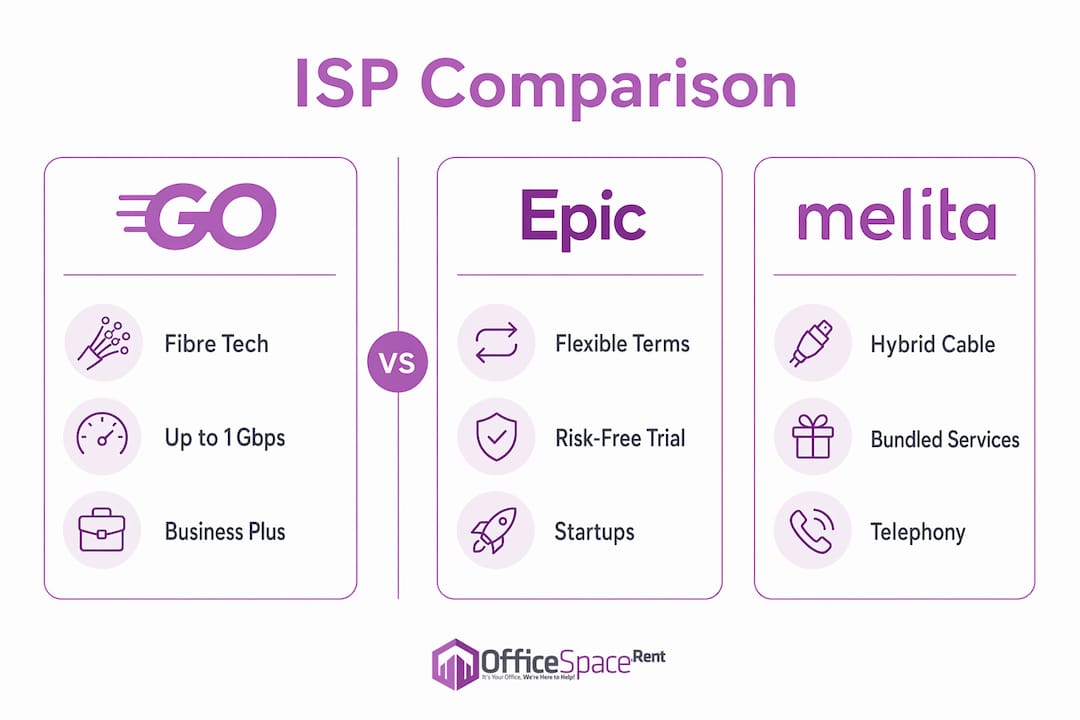
GO is the dominant fibre provider in Malta. Its Business Plus range offers speeds up to 1 Gbps downstream, while enterprise tiers reach 10 Gbps via the Infinity Pro and Infinity X plans. GO suits larger offices and organisations that prioritise fibre reliability and broad geographic coverage across Malta and Gozo.
Melita competes strongly through its hybrid cable and fibre network, often bundling broadband with business telephony and television services. This makes it attractive for offices that want a single provider managing multiple communications services under one contract.
Epic differentiates itself through contract flexibility, offering 12-month terms and a 30-day risk-free trial. For start-ups, co-working operators, or businesses in temporary premises, this reduces commitment risk considerably. Epic’s 4G and 5G mobile broadband options also provide a practical fallover layer.
When choosing between providers, request references from businesses of a similar size and sector. Customer service responsiveness during outages is a differentiator that no brochure will advertise honestly.
What should you look for in SLAs and backup connectivity?
SLA-backed connectivity and redundant links are the most effective protection against costly downtime in commercial internet use. An SLA is a contractual commitment from the provider covering uptime guarantees, fault response times, and compensation terms.
When reviewing any SLA, assess these four elements in order:
- Uptime guarantee: Business-grade SLAs typically commit to 99.9 per cent or higher annual uptime. Anything below this threshold is insufficient for mission-critical operations.
- Fault response time: Distinguish between the time to acknowledge a fault and the time to resolve it. A four-hour acknowledgement window with a 48-hour resolution window is not the same as a four-hour fix.
- Compensation terms: Understand what credit or refund applies if the provider breaches the SLA. Credits that amount to one day’s service cost provide little incentive for rapid resolution.
- Escalation procedures: Confirm there is a named business account manager or a dedicated support line, not a shared consumer helpdesk.
Redundancy planning sits alongside SLA review. A secondary connection from a different provider or technology type eliminates the single point of failure that even the best SLA cannot fully prevent. Mobile broadband routers using 4G or 5G, such as the Vodafone GigaCube, provide cost-effective failover for small offices without requiring a second fixed-line installation.
Pro Tip: When negotiating an SLA, specify the metrics that matter most to your business. A video production company should negotiate latency thresholds and upload saturation limits. A financial services firm should prioritise packet loss and jitter commitments for VoIP and trading platforms.
Security features and scalability for Malta office internet
DNS filtering, advanced firewalls, and managed security services are not optional extras for business internet. They are baseline requirements, particularly for offices handling client data, financial records, or regulated information.
When evaluating security provisions from any provider, confirm the following:
- DNS filtering: Blocks access to known malicious domains at the network level before threats reach individual devices.
- Managed firewall: A provider-managed firewall reduces the burden on internal IT staff and applies updates automatically.
- Guest Wi-Fi segregation: Any office receiving clients or visitors needs a physically separate guest network. Shared access between staff and visitors creates unacceptable security exposure.
- Multi-site support: For businesses operating across several Malta locations, verify that the ISP can deliver consistent security policies and centralised management across all sites.
Scalability deserves equal attention. The ability to upgrade bandwidth and add locations without renegotiating an entire contract is a practical necessity for growing businesses. Ask providers specifically whether speed upgrades mid-contract incur penalties and how quickly additional capacity can be provisioned. For offices in business districts such as Mriehel or Attard, where fibre infrastructure is well established, provisioning timelines are generally shorter than in peripheral locations.
How to manage contracts, costs, and installation timelines
Contract management is where many businesses lose value. Choosing internet plans in Malta without scrutinising the full cost of ownership leads to unexpected charges and inflexible arrangements.
Follow these steps before signing any agreement:
- Compare total contract cost, not monthly headline price. Include installation fees, equipment deposits, and any early termination penalties. A lower monthly rate on a 24-month contract can cost more overall than a higher rate on a 12-month term if your needs change.
- Clarify installation timelines upfront. Offices in buildings with existing fibre infrastructure can be connected within days. New builds or properties requiring duct work may take four to eight weeks. Confirm this before committing to a lease start date.
- Negotiate bundled services carefully. Telephony and TV bundles can reduce per-service cost but create dependency on a single provider. If that provider underperforms, switching becomes more disruptive.
- Use trial periods where available. Epic’s 30-day trial is a genuine risk-reduction tool. Use it to test real-world performance under your actual workload before committing to a full term.
Understanding contract flexibility is particularly valuable for businesses in growth phases or those occupying serviced offices with shorter lease terms.
Key takeaways
Selecting office internet in Malta requires matching bandwidth to workload, comparing GO, Melita, and Epic on reliability and contract terms, and securing SLA-backed uptime with a redundancy plan.
| Point | Details |
|---|---|
| Workload-first analysis | Map devices, apps, and upload demands before requesting any provider quotes. |
| Provider differentiation | GO leads on fibre coverage; Epic offers the most flexible contract terms and trial options. |
| SLA specificity | Negotiate SLA metrics tied to your actual failure risks, not generic uptime percentages. |
| Redundancy is non-negotiable | A secondary 4G or 5G connection eliminates the single point of failure no SLA can fully cover. |
| Contract cost scrutiny | Compare total contract cost including installation, deposits, and exit fees, not monthly price alone. |
Our view on evaluating office internet in Malta
At Officespace, we work with businesses across Malta at every stage of their office search, and the connectivity conversation comes up consistently. The most common error we observe is treating internet selection as an afterthought once the lease is signed. By that point, the building’s infrastructure may constrain your options, and the provider serving that postcode may not match your requirements.
The businesses that get this right start the evaluation before they commit to a space. They ask landlords and agents which providers serve the building, whether fibre is already terminated on the floor plate, and what the provisioning timeline looks like. These questions belong in the same conversation as rent per square metre and break clauses.
Upload speed is the metric most frequently overlooked. A 1 Gbps download connection with only 60 Mbps upload is inadequate for any office running regular cloud backups, video production workflows, or hosted server environments. Symmetrical fibre, where available, is worth the premium. On SLAs, we would go further than most guides suggest: do not accept a standard template. Negotiate the specific metrics that reflect your operational risk, whether that is latency for financial applications or upload saturation for media workflows. The providers operating in Malta’s business districts are accustomed to these conversations.
— OfficeSpace.Rent
Find Malta office spaces with the right connectivity infrastructure
Officespace lists commercial office spaces across Malta’s key business districts, including Mriehel, Attard, and St Paul’s Bay, with property details that support connectivity evaluation alongside standard leasing criteria. Many listings indicate existing fibre infrastructure, building-level ISP availability, and readiness for immediate occupation, which directly reduces the risk of connectivity delays after signing.
Explore offices in Mriehel, one of Malta’s most connected commercial zones, or browse the complete Malta office guide to understand how location affects both internet infrastructure and overall operating costs. The Officespace team can advise on which buildings already have preferred ISPs active and which require new installations.
FAQ
What is the best internet provider for offices in Malta?
GO, Melita, and Epic each serve different business profiles. GO leads on fibre coverage and enterprise speed tiers; Epic suits businesses needing shorter contracts and trial flexibility.
How much bandwidth does a Malta office typically need?
A ten-person office running standard cloud tools requires at least 100 Mbps symmetric. Larger teams or upload-intensive workflows such as video production require 500 Mbps to 1 Gbps.
What should an SLA for office internet include?
A business SLA should specify uptime guarantees of 99.9 per cent or above, fault resolution timeframes, compensation terms for breaches, and a dedicated business support contact.
How long does office internet installation take in Malta?
Buildings with existing fibre infrastructure can be connected within days. New installations requiring duct work or external cabling typically take four to eight weeks.
Is a backup internet connection necessary for Malta offices?
For any business where downtime carries financial or reputational cost, a secondary connection using 4G or 5G mobile broadband provides cost-effective failover without a second fixed-line contract.